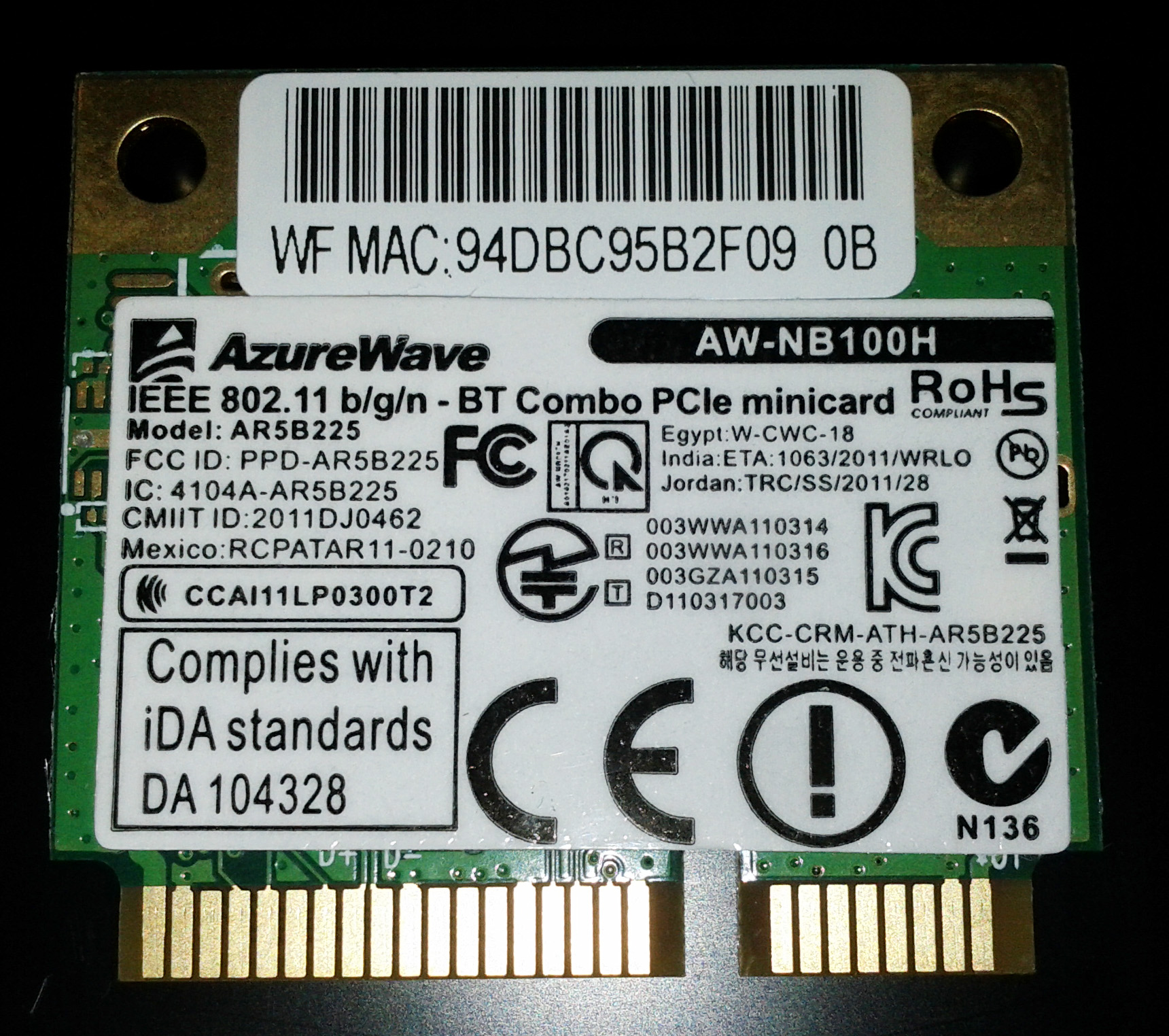
 This is a quick hack, not a real problem solver for this Azurewave AW-NB100H which also identified as AR5B225 and comes as a combo WLAN and Bluetooth 3.0 half size mini pci-e card. There are no linux driver references for this card i could find at this very moment, even on Qualcomm Atheros and Azurewave site, only this one and only Wikidevi page. It mention about already supported by ath9k using compat wireless or passys using ndiswrapper, but in fact there is no working driver even using the latest compat wireless build 22 April 2012.
Using ubuntu oneiric with kernel-3.0.0-17 and klixs-2012 with kernel-3.2.13-jf6-bfs all cannot detect this WLAN, the bluetooth itself is ready to go.
Here is what lspci gives :
{code}[root@user-B74 user]# lspci
00:00.0 Host bridge: Intel Corporation 2nd Generation Core Processor Family DRAM Controller (rev 09)
00:01.0 PCI bridge: Intel Corporation Xeon E3-1200/2nd Generation Core Processor Family PCI Express Root Port (rev 09)
00:02.0 VGA compatible controller: Intel Corporation 2nd Generation Core Processor Family Integrated Graphics Controller (rev 09)
00:14.0 USB Controller: Intel Corporation Panther Point USB xHCI Host Controller (rev 04)
00:16.0 Communication controller: Intel Corporation Panther Point MEI Controller #1 (rev 04)
00:1a.0 USB Controller: Intel Corporation Panther Point USB Enhanced Host Controller #2 (rev 04)
00:1b.0 Audio device: Intel Corporation Panther Point High Definition Audio Controller (rev 04)
00:1c.0 PCI bridge: Intel Corporation Panther Point PCI Express Root Port 1 (rev c4)
00:1c.1 PCI bridge: Intel Corporation Panther Point PCI Express Root Port 2 (rev c4)
00:1c.2 PCI bridge: Intel Corporation Panther Point PCI Express Root Port 3 (rev c4)
00:1d.0 USB Controller: Intel Corporation Panther Point USB Enhanced Host Controller #1 (rev 04)
00:1f.0 ISA bridge: Intel Corporation Panther Point LPC Controller (rev 04)
00:1f.2 SATA controller: Intel Corporation Panther Point 6 port SATA AHCI Controller (rev 04)
00:1f.3 SMBus: Intel Corporation Panther Point SMBus Controller (rev 04)
03:00.0 Network controller: Atheros Communications Inc. Device 0037 (rev 01)
04:00.0 Ethernet controller: Atheros Communications Device 1091 (rev 10)
[root@user-B74 user]#{/code}
Searching and searching the net for the exactly atheros chipset type used on this card and finally found it as AR9485, but unfortunately the pci id wasn’t yet implemented :
{code}03:00.0 Network controller [0280]: Atheros Communications Inc. Device [168c:0037] (rev 01)
Subsystem: AzureWave Device [1a3b:2100]{/code}
{code}[root@user-B14 ath9k]# modinfo ath9k | egrep ‘168c|0037’
[root@user-B14 ath9k]#{/code}
Hacking the latest compat-wireless and added the pci id above, and repackage. You may get it here.
Extract them to some folder, and compile as usual :
{code}[root@user-B74 compat-wireless-2012-04-22-p]# ./scripts/driver-select ath9k
Processing new driver-select request…
Backup exists: Makefile.bk
Backup exists: Makefile.bk
Backup exists: Makefile.bk
Backup exists: Makefile.bk
Backup exists: Makefile.bk
Backup exists: drivers/net/wireless/Makefile.bk
Backup exists: drivers/net/wireless/ath/Makefile.bk
Backup exists: net/wireless/Makefile.bk
Backup exists: drivers/ssb/Makefile.bk
Backup exists: drivers/bcma/Makefile.bk
Backup exists: drivers/misc/eeprom/Makefile.bk
Backup exists: Makefile.bk
[root@user-B74 compat-wireless-2012-04-22-p]#{/code}
Make sure you’re working on clean table :
{code}[root@user-B74 compat-wireless-2012-04-22-p]# make clean
make[1]: Entering directory `/usr/src/linux-headers-3.0.0-17-generic’
make[1]: Leaving directory `/usr/src/linux-headers-3.0.0-17-generic’
[root@user-B74 compat-wireless-2012-04-22-p]# {/code}
then do compiling the code :
{code}[root@user-B74 compat-wireless-2012-04-22-p]# make
./scripts/gen-compat-autoconf.sh /usr/src/compat-wireless-2012-04-22-p/.config /usr/src/compat-wireless-2012-04-22-p/config.mk > include/linux/compat_autoconf.h
make -C /lib/modules/3.0.0-17-generic/build M=/usr/src/compat-wireless-2012-04-22-p modules
make[1]: Entering directory `/usr/src/linux-headers-3.0.0-17-generic’
CC [M] /usr/src/compat-wireless-2012-04-22-p/compat/main.o
CC [M] /usr/src/compat-wireless-2012-04-22-p/compat/compat-3.2.o
CC [M] /usr/src/compat-wireless-2012-04-22-p/compat/compat-3.3.o
CC [M] /usr/src/compat-wireless-2012-04-22-p/compat/compat-3.5.o
CC [M] /usr/src/compat-wireless-2012-04-22-p/compat/cordic.o
CC [M] /usr/src/compat-wireless-2012-04-22-p/compat/crc8.o
CC [M] /usr/src/compat-wireless-2012-04-22-p/compat/compat_atomic.o
LD [M] /usr/src/compat-wireless-2012-04-22-p/compat/compat.o
CC [M] /usr/src/compat-wireless-2012-04-22-p/drivers/net/wireless/ath/main.o
… blah blah blah
Building modules, stage 2.
MODPOST 9 modules
CC /usr/src/compat-wireless-2012-04-22-p/compat/compat.mod.o
LD [M] /usr/src/compat-wireless-2012-04-22-p/compat/compat.ko
CC /usr/src/compat-wireless-2012-04-22-p/drivers/net/wireless/ath/ath.mod.o
LD [M] /usr/src/compat-wireless-2012-04-22-p/drivers/net/wireless/ath/ath.ko
CC /usr/src/compat-wireless-2012-04-22-p/drivers/net/wireless/ath/ath9k/ath9k.mod.o
LD [M] /usr/src/compat-wireless-2012-04-22-p/drivers/net/wireless/ath/ath9k/ath9k.ko
CC /usr/src/compat-wireless-2012-04-22-p/drivers/net/wireless/ath/ath9k/ath9k_common.mod.o
LD [M] /usr/src/compat-wireless-2012-04-22-p/drivers/net/wireless/ath/ath9k/ath9k_common.ko
CC /usr/src/compat-wireless-2012-04-22-p/drivers/net/wireless/ath/ath9k/ath9k_htc.mod.o
LD [M] /usr/src/compat-wireless-2012-04-22-p/drivers/net/wireless/ath/ath9k/ath9k_htc.ko
CC /usr/src/compat-wireless-2012-04-22-p/drivers/net/wireless/ath/ath9k/ath9k_hw.mod.o
LD [M] /usr/src/compat-wireless-2012-04-22-p/drivers/net/wireless/ath/ath9k/ath9k_hw.ko
CC /usr/src/compat-wireless-2012-04-22-p/net/mac80211/mac80211.mod.o
LD [M] /usr/src/compat-wireless-2012-04-22-p/net/mac80211/mac80211.ko
CC /usr/src/compat-wireless-2012-04-22-p/net/rfkill/rfkill-regulator.mod.o
LD [M] /usr/src/compat-wireless-2012-04-22-p/net/rfkill/rfkill-regulator.ko
CC /usr/src/compat-wireless-2012-04-22-p/net/wireless/cfg80211.mod.o
LD [M] /usr/src/compat-wireless-2012-04-22-p/net/wireless/cfg80211.ko
make[1]: Leaving directory `/usr/src/linux-headers-3.0.0-17-generic’
[root@user-B74 compat-wireless-2012-04-22-p]#{/code}
and finally install them to the system :
{code}[root@user-B74 compat-wireless-2012-04-22-p]# make install
make -C /lib/modules/3.0.0-17-generic/build M=/usr/src/compat-wireless-2012-04-22-p modules
make[1]: Entering directory `/usr/src/linux-headers-3.0.0-17-generic’
Building modules, stage 2.
MODPOST 9 modules
make[1]: Leaving directory `/usr/src/linux-headers-3.0.0-17-generic’
make -C /lib/modules/3.0.0-17-generic/build M=/usr/src/compat-wireless-2012-04-22-p “INSTALL_MOD_DIR=updates”
modules_install
make[1]: Entering directory `/usr/src/linux-headers-3.0.0-17-generic’
INSTALL /usr/src/compat-wireless-2012-04-22-p/compat/compat.ko
INSTALL /usr/src/compat-wireless-2012-04-22-p/drivers/net/wireless/ath/ath.ko
INSTALL /usr/src/compat-wireless-2012-04-22-p/drivers/net/wireless/ath/ath9k/ath9k.ko
INSTALL /usr/src/compat-wireless-2012-04-22-p/drivers/net/wireless/ath/ath9k/ath9k_common.ko
INSTALL /usr/src/compat-wireless-2012-04-22-p/drivers/net/wireless/ath/ath9k/ath9k_htc.ko
INSTALL /usr/src/compat-wireless-2012-04-22-p/drivers/net/wireless/ath/ath9k/ath9k_hw.ko
INSTALL /usr/src/compat-wireless-2012-04-22-p/net/mac80211/mac80211.ko
INSTALL /usr/src/compat-wireless-2012-04-22-p/net/rfkill/rfkill-regulator.ko
INSTALL /usr/src/compat-wireless-2012-04-22-p/net/wireless/cfg80211.ko
DEPMOD 3.0.0-17-generic
make[1]: Leaving directory `/usr/src/linux-headers-3.0.0-17-generic’
depmod will prefer updates/ over kernel/ — OK!
Now run:
sudo make unload to unload all: wireless, bluetooth and ethernet modules
sudo make wlunload to unload wireless modules
sudo make btunload to unload bluetooth modules
Run sudo modprobe driver-name to load your desired driver.
If unsure reboot.
[root@user-B74 compat-wireless-2012-04-22-p]#{/code}
then modprobe the modified ath9k module :
{code}[root@user-B74 compat-wireless-2012-04-22-p]# modprobe ath9k
[root@user-B74 compat-wireless-2012-04-22-p]#{/code}
check for wlan0 using ifconfig :
{code}[root@user-B74 compat-wireless-2012-04-22-p]# ifconfig
eth0 Link encap:Ethernet HWaddr e8:40:f2:86:df:91
inet addr:10.10.13.216 Bcast:10.10.13.255 Mask:255.255.255.0
inet6 addr: fe80::ea40:f2ff:fe86:df91/64 Scope:Link
UP BROADCAST RUNNING MULTICAST MTU:1500 Metric:1
RX packets:16159 errors:0 dropped:0 overruns:0 frame:0
TX packets:3475 errors:0 dropped:0 overruns:0 carrier:1
collisions:0 txqueuelen:1000
RX bytes:7596912 (7.5 MB) TX bytes:343259 (343.2 KB)
Interrupt:18
lo Link encap:Local Loopback
inet addr:127.0.0.1 Mask:255.0.0.0
inet6 addr: ::1/128 Scope:Host
UP LOOPBACK RUNNING MTU:16436 Metric:1
RX packets:4 errors:0 dropped:0 overruns:0 frame:0
TX packets:4 errors:0 dropped:0 overruns:0 carrier:0
collisions:0 txqueuelen:0
RX bytes:240 (240.0 B) TX bytes:240 (240.0 B)
wlan0 Link encap:Ethernet HWaddr 94:db:c9:5b:2f:09
UP BROADCAST MULTICAST MTU:1500 Metric:1
RX packets:0 errors:0 dropped:0 overruns:0 frame:0
TX packets:0 errors:0 dropped:0 overruns:0 carrier:0
collisions:0 txqueuelen:1000
RX bytes:0 (0.0 B) TX bytes:0 (0.0 B)
[root@user-B74 compat-wireless-2012-04-22-p]#{/code}
Turn on the WLAN key Fn+F2 if it’s on OFF state and your AP should listed at network manager.
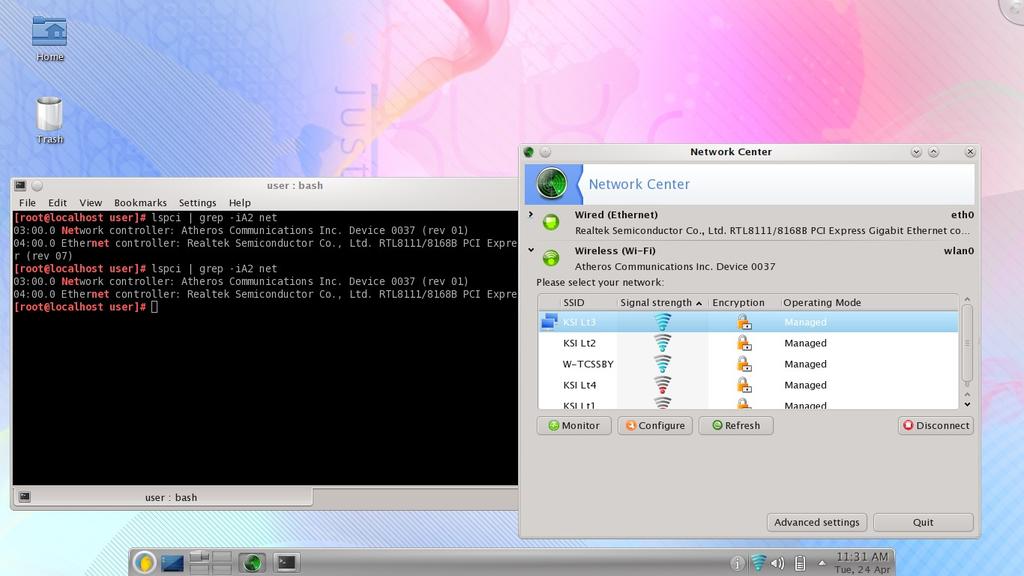

Like I mention above, this is a quick hack, you better wait for the driver maintainer to reach kernel upstream, and oh … I don’t have to explain that you have to repeat this steps each time you install a new kernel.
Have fun.


